Plans, Usage, and Billing
Open Team Settings > Team Plan to review the active plan, included log volume, retention, next billing date, and pay-as-you-go budget. Only the team owner can change the plan or access billing and invoices.
Prices, currencies, included volume, and plan features can change. Use the Bugfender pricing page for the current commercial offer. The dashboard shows the options available to the selected team and currency.
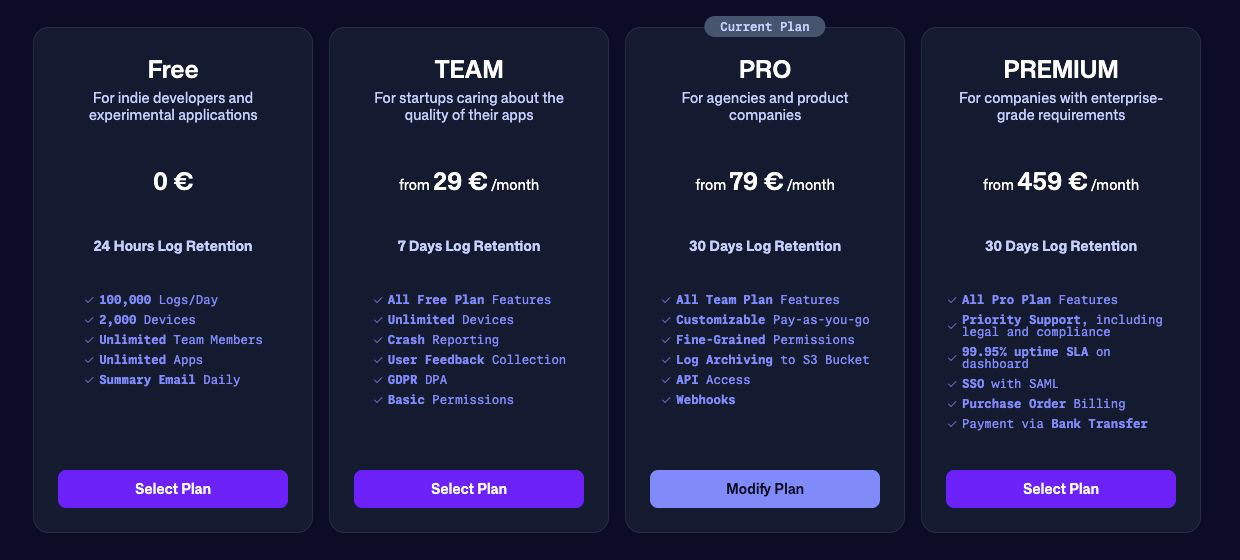
Compare plans
The current plan families are:
| Plan | Intended use | Notable capabilities |
|---|---|---|
| Free | Evaluation, personal work, and small projects | Remote logging, a daily log allowance, short retention, and a limited number of devices. |
| Team | Small teams that need predictable production logging | Monthly log volume, longer retention, unlimited devices, crash reporting, user feedback, and basic permissions. |
| Pro | Growing product teams and agencies | Longer retention, fine-grained permissions, configurable pay-as-you-go, Amazon S3 or Microsoft Azure Blob Storage archiving, API access, and webhooks. |
| Premium | Organizations with compliance, support, or purchasing requirements | Pro capabilities plus priority support, an uptime SLA, SAML SSO, purchase-order billing, bank transfer, and custom options. |
Paid plans currently include unlimited applications and team members and start with a reserved monthly log volume. Contact Bugfender when you need custom retention, volume, deployment, compliance, or support terms.
Understand log volume
Bugfender uses these terms:
- Pre-reserved logs are the volume included in the subscription and purchased in advance.
- Pay-as-you-go (PAYG) covers additional usage beyond the reserved amount, up to the configured budget.
- Usage limit is the combined amount Bugfender can accept before collection pauses for the remainder of the usage period.
Application logs, crash reports, issues, and user feedback contribute to the team’s log volume. Each crash report, issue, or feedback submission counts as one log line.
Usage resets monthly on the same calendar day as the billing start date, including for annually billed plans. PAYG usage on annual plans is still invoiced monthly.
Usage examples
Suppose a plan includes 10 million pre-reserved logs per month:
| Usage | PAYG budget | Result |
|---|---|---|
| 8 million | Any | Usage remains within the subscription; no PAYG volume is billed. |
| 12.5 million | 3 million | The extra 2.5 million is billed in whole-million increments, so 3 million PAYG logs are billed. |
| 12.5 million | 1 million | Bugfender accepts 11 million logs. The remaining 1.5 million are discarded after the limit is exhausted. |
Logs discarded because the usage limit was exhausted cannot be recovered later. Monitor usage before traffic peaks and set a budget that matches the amount of telemetry you are prepared to collect.
Monitor usage
Open Team Settings > Logs Usage to see:
- month-to-date usage;
- the current daily average;
- projected end-of-month usage;
- usage split by application;
- the included limit;
- PAYG usage, limit, and estimated cost when available.
Use the application breakdown to find unexpected growth. A release that produces repetitive logs can consume a large portion of the team quota even when the number of active devices has not changed.
Change a plan or PAYG budget
From Team Plan, the owner can:
- select Change Plan to compare available plans;
- select Change Budget when the plan supports a configurable PAYG limit;
- review a scheduled downgrade or cancellation and its effective date.
Review the confirmation screen carefully. It shows the selected billing interval, currency, applicable taxes, proration, and when the change takes effect.
The Team plan uses a fixed maximum PAYG budget based on reserved volume. Pro and Premium plans support a configurable maximum budget. When both reserved volume and PAYG are exhausted, data collection pauses rather than creating an unlimited bill.
For a detailed explanation, see Understanding Bugfender’s Pricing Model.
Billing information and invoices
The team owner can use:
- Billing Information to add or update the billing name, address, tax information, invoice email, and payment card;
- Invoices to open available invoices;
- Team Plan to review the next subscription and PAYG billing dates.
Card information is processed by Bugfender’s payment provider. Do not send complete card details through support tickets. Premium and custom plans can provide additional purchasing options; see the current pricing page or contact Bugfender.
For billing procedures such as changing a card, downloading an invoice, cancelling, or placing a purchase order, see the Plans and Billing collection.