Network
Endpoint normalization is currently in beta and may not be available for every account.
The Network view aggregates captured HTTP activity by domain, normalized endpoint, and method. It helps you find request failures and performance problems without reading each request individually.
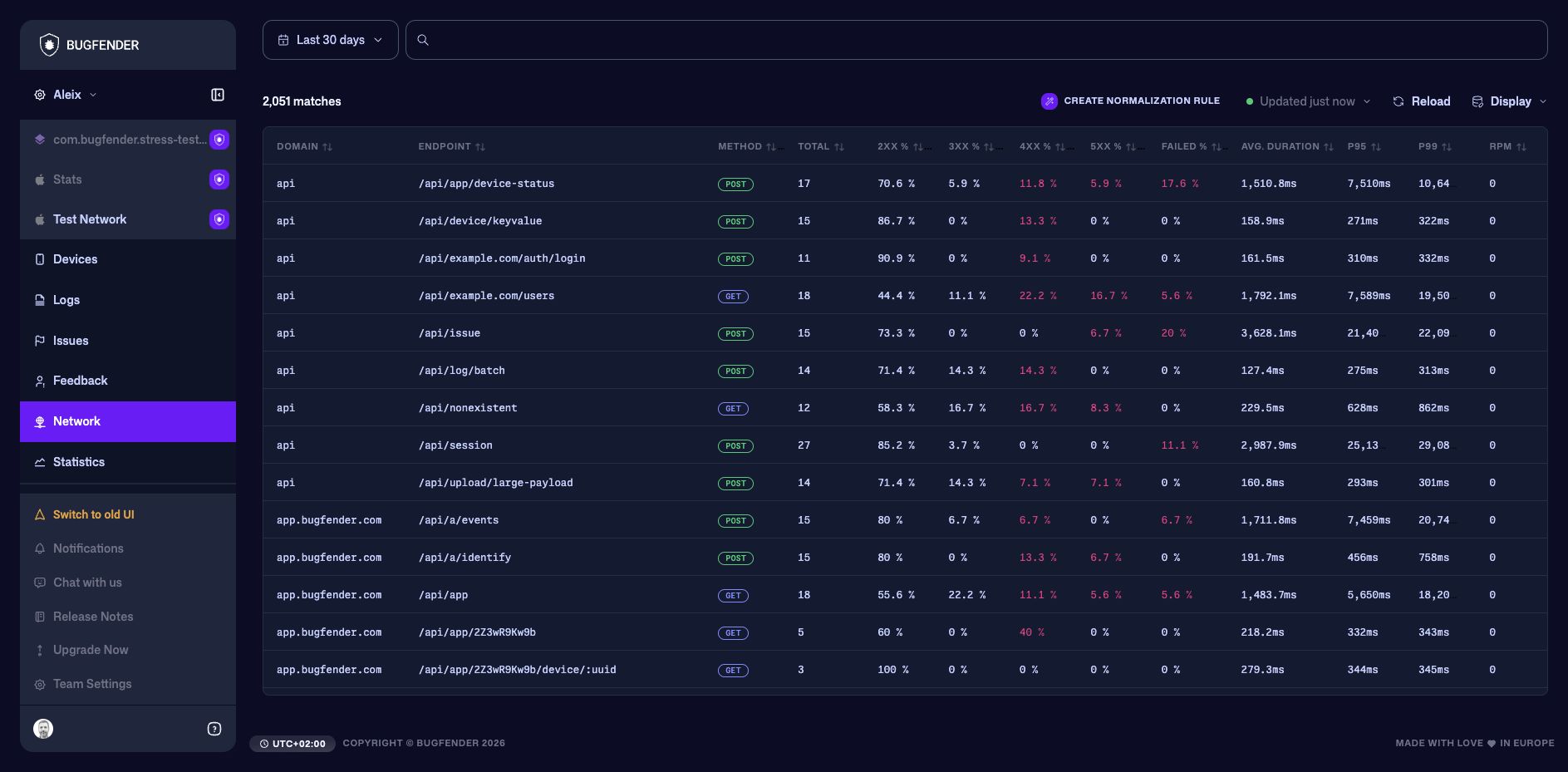
Read the endpoint table
- Total is the number of matching requests.
- 2XX, 3XX, 4XX, and 5XX show the distribution of HTTP response classes.
- Failed highlights requests that did not complete successfully.
- Avg Duration shows the mean latency.
- P95 and P99 expose slow-tail behavior that an average can hide.
- RPM shows request volume over time.
Start with endpoints that combine meaningful traffic with a high failure rate or poor tail latency. Open an endpoint to inspect the request samples and the devices affected.
Understand normalized endpoints
An endpoint is the stable route Bugfender uses to group requests. Without normalization, a dynamic value can create a separate row for every user, order, tenant, or resource:
| Request path | Normalized endpoint |
|---|---|
/users/123/orders/891 | /users/:id/orders/:id |
/users/456/orders/1042 | /users/:id/orders/:id |
Bugfender automatically:
- ignores the query string and fragment;
- collapses duplicate slashes and removes a trailing slash;
- replaces common dynamic segments such as integers, UUIDs, dates, long hexadecimal values, and long opaque tokens.
These common paths usually need no custom rule:
| Request path | Automatic endpoint |
|---|---|
/users/123/profile | /users/:id/profile |
/devices/550e8400-e29b-41d4-a716-446655440000/logs | /devices/:uuid/logs |
/exports/2026-07-24/report | /exports/:date/report |
/assets/5f2d7c9e4a2b3d1c8e9f0a12 | /assets/:hex |
/search?query=network&page=2 | /search |
Short identifiers and application-specific values are intentionally left unchanged because Bugfender cannot know whether a value such as alice, ORD-1042, or acme is an identifier or a meaningful literal route. Create a normalization rule when those values split one logical endpoint into many rows.
Normalization changes the endpoint used by the Network view for grouping and metrics. It does not change the request, rewrite the captured URL, or alter the original network log.
Review normalization suggestions
Bugfender can identify paths from recent network traffic that appear to contain dynamic segments. Open Settings > Endpoint Normalization to review suggestions generated from the last seven days.
For each suggestion:
- Compare the sample paths and proposed template.
- Accept it to open a prefilled template rule.
- Rename placeholders when a more descriptive name would help.
- Check the sample preview and scope before saving.
- Dismiss it instead when the paths should remain separate or the template is too broad.
A suggestion is evidence of a repeated pattern, not proof that every matching segment is an identifier. In particular, check that literal routes such as /search or /settings will not be absorbed by a placeholder.
Create a normalization rule
You can start from Network > Create normalization rule, or open Settings > Endpoint Normalization and select Add new rule. Creating and editing rules, including accepting suggestions, requires the Developer role or higher. Viewers with application access can inspect rules and test normalization without changing the configuration.
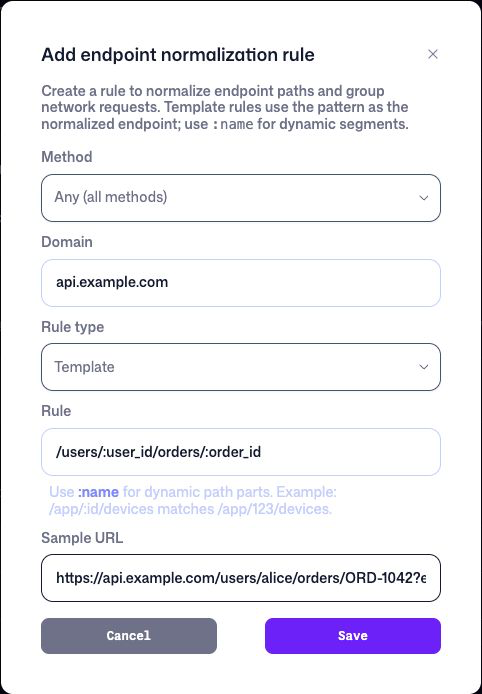
For example, use this template rule to group orders for every user:
| Field | Value |
|---|---|
| Method | Any |
| Domain | api.example.com |
| Rule type | Template |
| Rule | /users/:user_id/orders/:order_id |
| Sample URL | https://api.example.com/users/alice/orders/ORD-1042?expand=items |
| Normalized endpoint | /users/:user_id/orders/:order_id |
- Limit the rule to an HTTP method or domain when the same path has different meanings elsewhere. Leave either field empty or set it to Any to match more broadly.
- Choose Template for most routes.
- Replace each dynamic path segment with a descriptive placeholder such as
:user_id. - Enter a representative Sample URL and confirm the preview.
- Save the rule.
Template rules
A template placeholder begins with : and matches exactly one path segment. Literal segments must match exactly.
| Template | Matches | Does not match |
|---|---|---|
/users/:user_id | /users/alice | /users/alice/orders |
/orders/:order_id | /orders/ORD-1042 | /orders |
/apps/:app_id/count | /apps/abc123/count | /apps/abc123/ios/count |
Placeholders must have unique names within a rule. They do not match recursively across multiple /-separated segments. Query parameters are not part of the match.
Practical template examples:
| Situation | Requests | Template rule |
|---|---|---|
| Short public IDs | /apps/Bqr5rMgbgp, /apps/X8Qm2ZaP01 | /apps/:app_id |
| Tenant and project slugs | /tenants/acme/projects/mobile, /tenants/umbrella/projects/portal | /tenants/:tenant/projects/:project |
| Human-readable order IDs | /users/alice/orders/ORD-1042, /users/bob/orders/ORD-9910 | /users/:user_id/orders/:order_id |
| Nested device resource | /apps/demo/device/phone-7/logs, /apps/demo/device/tablet-2/logs | /apps/:app_id/device/:device_id/logs |
Regex rules
Use Regex when a template would match too broadly. Regex rules:
- use Go/RE2-compatible syntax;
- match the normalized URL path, not the domain, query string, or fragment;
- match the complete path;
- require a separate static Normalized endpoint value.
For example:
Rule: ^/api/app/[A-Za-z0-9]{10}/devices/count$
Normalized endpoint: /api/app/:app_id/devices/count
Regex capture groups are not inserted into the normalized endpoint. Use a stable, descriptive placeholder in the output instead.
For example, /api/v2/invoices/:invoice_id would also match the literal route /api/v2/invoices/search. To accept only invoice IDs such as INV-1042, use:
Rule: ^/api/v2/invoices/[A-Z]+-[0-9]+$
Normalized endpoint: /api/v2/invoices/:invoice_id
Control rule scope and priority
Rules belong to one Bugfender application. Each rule can be restricted to one domain and HTTP method.
Enabled rules run from top to bottom, and the first matching rule wins. Drag rules in Settings > Endpoint Normalization to change their priority. Disable a rule to keep it without applying it, or delete it when it is no longer needed.
Use narrow domain and method scopes for overlapping APIs. Put the most specific rules above broader rules.
For example, /reports/:report_id also matches the literal path /reports/daily. Keep an exact /reports/daily rule above the broader rule when those routes must remain separate:
| Priority | Rule | Result |
|---|---|---|
| 1 | /reports/daily | /reports/daily remains its own group |
| 2 | /reports/:report_id | /reports/RPT-1042 becomes /reports/:report_id |
Avoid replacing meaningful route names with placeholders. A rule such as /:section/:page could merge /account/settings, /products/search, and /support/contact into one misleading endpoint.
Test rules and wait for updated groups
The rule editor previews a draft against its sample URL without saving it. The Test Normalization section applies all saved, enabled rules to a sample request using the same logic as ingestion.
New matching requests use the active rules. After you save, enable, disable, delete, or reorder rules, Bugfender also updates historical Network aggregates on a schedule, typically within 10 minutes. The original network logs and raw URLs remain unchanged.
If a request does not produce the expected endpoint, check that:
- the rule is enabled;
- its method and domain match the sample;
- a higher-priority rule is not matching first;
- a template has the same number of path segments as the request;
- the rule starts with
/and does not contain a query string or fragment.